
That notification buzzing on your phone might be a trap designed to give hackers full remote control of your device. A dangerous Android malware named Vultur is surging, and it doesn't just steal your passwords; it records your entire screen to hijack your banking and crypto apps. This isn't just another virus; this is a full-blown remote takeover of your digital life.
This new wave of attacks is a harsh reminder that Android's New Threat: Your Phone Isn’t Safe.
Vultur Malware: Hijacking Phones Now
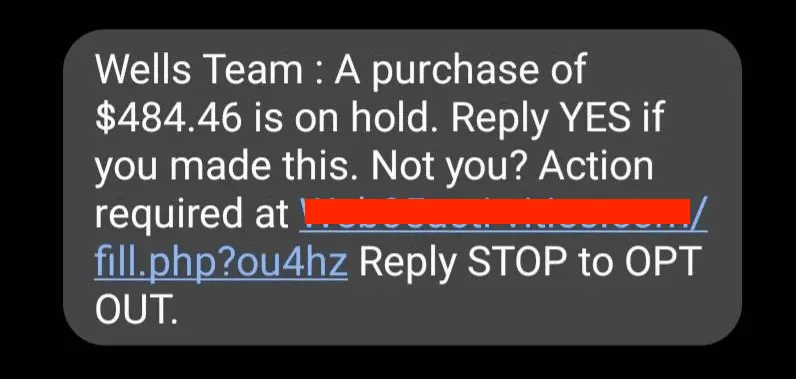
Security researchers are raising alarms about a new version of the Vultur banking trojan. This malware tricks users by sending an SMS about a fake unauthorized transaction and instructing them to call a number. On the call, a scammer convinces the user to install a "security app," which is actually the malware, giving attackers complete remote access.
It’s spreading fast because it exploits human trust, not just software flaws.
A user on a cybersecurity forum reported, "I thought I was securing my bank account. Instead, I gave them the keys. They watched everything I did and drained my crypto wallet while I slept."
How This Vultur Attack Works
Unlike simple password-stealing malware, Vultur uses Virtual Network Computing (VNC) to stream a live recording of your screen directly to the attackers. It uses Accessibility Services to log your keystrokes, see what app is open, and then uses that information to control your device, perform swipes, and click buttons.
Essentially, a hacker can watch you log into your bank and then kick you out and take over. This sophisticated approach shows that AI Malware Is Here & It's Learning and evolving beyond old methods.
Common Mistake: Blindly Trusting App Sources
The biggest mistake users make is installing apps from outside the official Google Play Store or granting powerful permissions without thinking. Vultur often hides inside apps that look legitimate, like a fake security app. Once you grant it Accessibility access, it's too late.
This simple error is a primary reason why a single Android Flaw Puts Millions of Phones at Risk.
Protecting Yourself Right Now
I get it, this sounds scary. It is. But you can protect yourself with a few key steps that block this malware completely. Your phone's security is in your hands.
Here’s what you need to do immediately:
| Action | Why It Works |
|---|---|
| Never Install Apps From Links | Only use the official Google Play Store. Vultur spreads via direct links in SMS messages. |
| Question All Permissions | If an app asks for Accessibility Services or Device Admin rights, deny it unless you are 100% certain of its purpose. |
| Verify Urgent Messages | If you get a fraud alert via SMS, don't call the number provided. Log into your bank's website directly to check. |
Taking these steps is critical because, as we've seen before, URGENT: All Phones Under Attack.
Final thoughts
The Vultur malware campaign is a preview of the future of mobile threats. These attacks are becoming more personal, using social engineering to trick you into handing over control. Expect hackers to refine these techniques, making it even harder to tell a real app from a fake one. The single most important habit is to always be skeptical of unsolicited messages and to treat every app installation with caution. In this environment, remembering that an Android Red Alert: Update Your Phone Right Now is not just a suggestion, it's essential for your digital survival.