
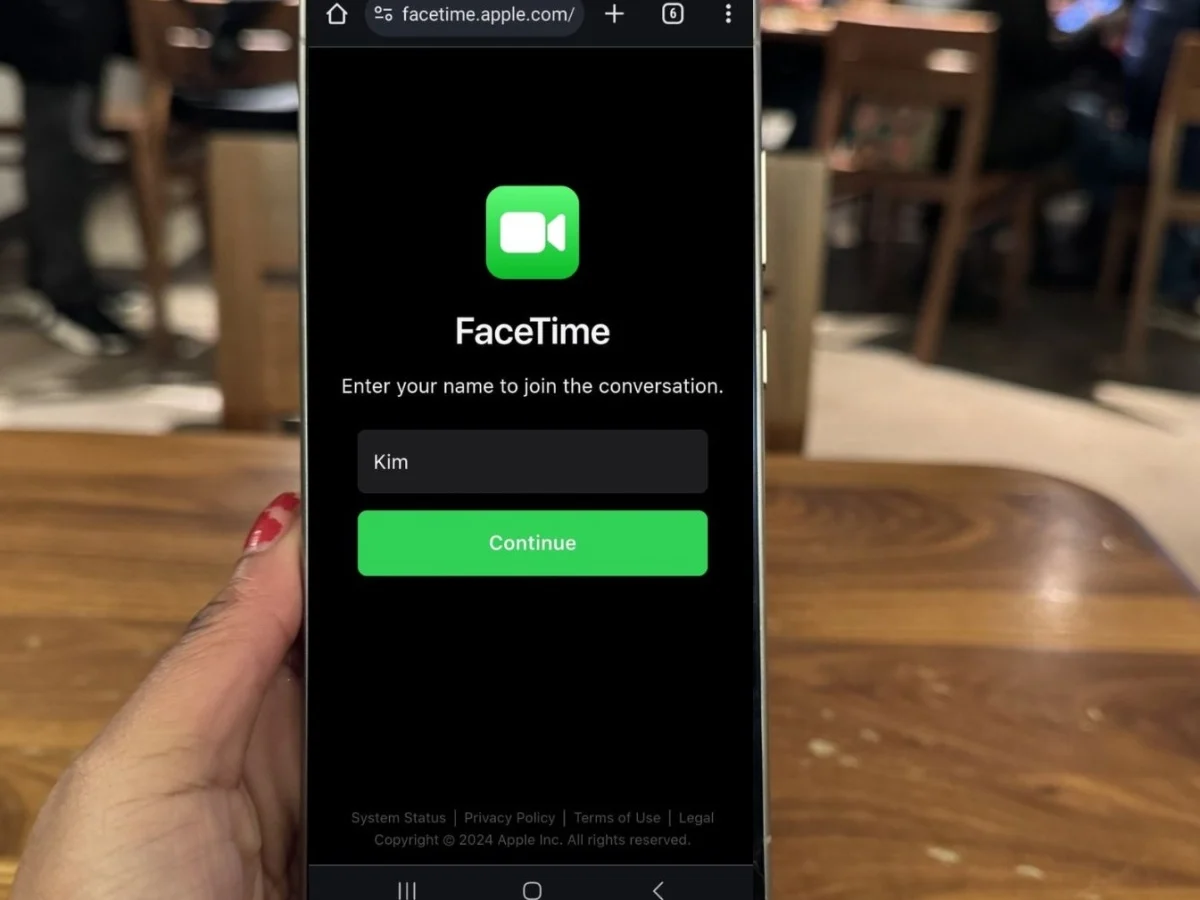
For years, Android users have watched from the sidelines as iPhone owners enjoyed seamless FaceTime calls. This created a real communication divide, leaving many feeling excluded from family chats and friend catch-ups. Imagine missing out on seeing your grandkids' milestones or struggling to coordinate video calls because of differing phone brands. This long-standing frustration often led to a clunky patchwork of alternative apps, never quite matching the simplicity of FaceTime. Many people just wanted a straightforward way to connect without buying a new phone.
Key Takeaways
- Android users can join FaceTime calls, but an Apple device owner must start and share a link for them to participate.
- All FaceTime calls on Android happen through a web browser (like Chrome or Edge), not a dedicated app.
- Despite being browser-based, these calls maintain strong end-to-end encryption for privacy.
Android Users Can Join FaceTime Calls Now
Android users can now join FaceTime calls, a significant shift that began with Apple's iOS 15 update in September 2021. This feature allows individuals without an iPhone, iPad, or Mac to participate in FaceTime conversations, breaking down a long-standing barrier in cross-platform communication. It’s a game-changer for staying connected across different devices.
How Android Users Join a FaceTime Call
Joining a FaceTime call from an Android phone is surprisingly straightforward, operating entirely through a web browser. An iPhone, iPad, or Mac user must first create a special link within the FaceTime app and then send it to the Android participant. Once the Android user receives this link, they simply click it to open the FaceTime call directly in their web browser, such as Google Chrome or Microsoft Edge.
This browser-based approach means there is no official FaceTime app to download or install on Android. After clicking the link, the Android user enters their name and requests to join the call, where the Apple device host then grants them access.
"Finally, I can see my grandkids on FaceTime! It's not perfect, but it works, and I don't need a new phone." – User on a tech forum
This capability significantly enhances connectivity, allowing Android users to engage in video calls they previously couldn't.
The iPhone User's Role: Creating the FaceTime Link
Android users cannot start FaceTime calls themselves; an Apple device owner must initiate the call and generate an invite link. This is a critical point that often causes confusion. The process is simple for the iPhone user.
To create a FaceTime link:
- Open the FaceTime app on your iPhone, iPad, or Mac.
- Tap "Create Link" (often a green button).
- Add a name for your chat if desired.
- Share the link through messages, email, or any other communication app. You can also simply copy the link to paste it wherever you choose.
- Join the call yourself after creating the link.
- Admit the Android user when they appear in the waiting room, by tapping to allow them in.
This workflow ensures that even though Android users can participate, Apple retains control over the call initiation, reflecting a strategic decision by the company.
Browser Compatibility for Android FaceTime
Not all web browsers are created equal when it comes to joining a FaceTime call on Android. For the smoothest experience, Android users should primarily use Google Chrome or Microsoft Edge. These browsers are officially supported and tend to offer the most reliable performance for web-based FaceTime.
Using other browsers like Firefox or Samsung Internet, while popular for general browsing, may lead to compatibility issues or a degraded experience, as they are not explicitly optimized for FaceTime's web interface.
Troubleshooting Common FaceTime Call Issues on Android
Even with the proper setup, Android users might encounter occasional glitches when joining FaceTime calls. Common problems include poor video quality, dropped calls, or issues with microphone and camera access. These can quickly become frustrating, especially during important family calls.
Fixing Connection Problems
- Check internet connection: A strong Wi-Fi or cellular data connection is vital for clear video and stable calls. Try switching between Wi-Fi and mobile data to see if one performs better.
- Restart your Android device: A simple restart can often resolve minor software bugs causing connection issues.
- Close other apps: Many apps running in the background can consume bandwidth and processing power, impacting FaceTime's performance. Close unnecessary applications before joining.
- Ask for a new link: In some cases, the original link might be faulty. Request a new FaceTime link from the Apple user.
Resolving Camera and Microphone Access
Browsers need explicit permission to access your phone's camera and microphone. If others can't see or hear you, check your browser's permissions.
- Grant permissions: When you first join, your browser will ask for camera and microphone access. Always tap "Allow."
- Adjust settings manually: If you denied access accidentally, go to your Android's Settings > Apps > [Your Browser, e.g., Chrome] > Permissions. Ensure both Microphone and Camera are set to "Allow only while using the app."
Understanding FaceTime's Limitations on Android
While the ability for Android users to join FaceTime is a welcome change, it's important to set realistic expectations. This web-based version is a streamlined experience, not a full native app. Android participants will not have access to many of the advanced FaceTime features available to Apple device users.
For example, features like SharePlay (for watching movies or listening to music together), special video effects (like Portrait mode or various filters), and screen sharing remain exclusive to Apple devices. This limited feature set is a strategic move by Apple, offering connectivity without fully opening up their proprietary ecosystem. Expert reviewers often note this as a calculated step to make FaceTime less exclusive while still maintaining distinct advantages for Apple hardware owners.
Security and Privacy in Web-Based FaceTime Calls
One common concern for Android users joining an Apple-centric service is data privacy. Rest assured, even when joining through a web browser, FaceTime calls remain private and secure with strong security measures.
Apple employs end-to-end encryption for all FaceTime calls, meaning only the participants in the call can access the conversation's audio and video content. Neither Apple nor any third party can decrypt or listen in on these calls. Apple also states it does not store the content of FaceTime calls on its servers. This robust encryption helps maintain confidentiality, offering peace of mind for users.
Common Mistake: Expecting a Native Android App
A frequent misconception among Android users is believing there's a dedicated FaceTime app for their devices. This is a crucial point of failure in user experience. Apple has not released, nor announced plans for, a native FaceTime app for Android phones. All FaceTime functionality for Android users is, and likely will remain, browser-based.
Expecting a native app can lead to wasted time searching app stores or even falling for scam apps disguised as FaceTime. Always remember: if you're on Android, FaceTime happens in your web browser, via a link.
FaceTime vs. Other Video Call Apps: An Android Viewpoint
While web-based FaceTime offers a way to connect with iPhone users, it's essential to compare it to other popular cross-platform video calling apps. For many Android users, alternatives still offer a more feature-rich and flexible experience for group calls and general usage.
Here’s a quick comparison:
| Feature | FaceTime (Web on Android) | Zoom Meetings | Google Meet (formerly Duo) | |
|---|---|---|---|---|
| Initiation | Apple user only | Anyone with account | Anyone with account | Anyone with account |
| Platform | Web browser only | Native app & Web | Native app & Web | Native app |
| Max Participants | Up to 32 (Apple side) | Up to 100 (free tier) | Up to 100 (free tier) | Up to 32 |
| Key Features | Basic video, mute, camera switch | Screen share, virtual backgrounds, chat, recording | Screen share, live captions, chat | Text, voice/video calls, group chat, media share |
| Security | End-to-end encrypted | End-to-end encrypted (optional) | End-to-end encrypted | End-to-end encrypted |
| Cost | Free | Free (with limits) / Paid tiers | Free / Paid tiers | Free |
For quick, casual chats initiated by an iPhone user, FaceTime on Android works adequately. However, for features like screen sharing, larger group calls, or the ability for any participant to start a call, apps like Zoom, Google Meet, or WhatsApp often provide a more robust experience for Android users.
Future of Android FaceTime: Native App or Continued Web Access?
Speculation often circulates about Apple eventually releasing a native FaceTime app for Android. However, industry analysis reveals that Apple's current strategy points towards continued web-based access rather than a full native application.
Providing web access allows Apple to appear more open and inclusive without fully compromising its ecosystem's perceived value. A native Android app would mean building and maintaining a separate application, potentially diverting resources and blurring the lines of Apple's tightly integrated hardware and software experience. This strategic limitation helps preserve a key differentiator for Apple devices.
"It's annoying that I can't start the call myself. My friends forget to send the link sometimes, and I just want to call them directly." – Reddit user
Conclusion: Bridging the Divide, One Link at a Time
The ability for Android users to join FaceTime calls via a web link is a welcome, if limited, evolution. It addresses a long-standing point of friction, allowing for greater cross-platform connectivity with friends and family who primarily use Apple devices. While the experience isn't on par with a native app, and key features remain exclusive to iOS, it offers a secure and accessible bridge for essential video communication.
Embrace this functionality for casual connections, but remember its limitations. For full-featured video conferencing or when you need to initiate the call, cross-platform alternatives like Google Meet or Zoom remain robust options. The power to connect is now more flexible than ever, even if it requires a little help from your iPhone-toting friends.
Frequently Asked Questions
Can Android users start a FaceTime call?
No, Android users cannot initiate a FaceTime call. An Apple device (iPhone, iPad, or Mac) user must create the FaceTime link and send it to the Android participant for them to join.
Is there a FaceTime app for Android?
No, there is no official FaceTime application for Android phones. All FaceTime calls on Android are joined through a compatible web browser like Google Chrome or Microsoft Edge.
Are FaceTime calls on Android secure?
Yes, FaceTime calls joined on an Android device via a web browser are still end-to-end encrypted. This means that only the participants in the call can access the content, ensuring a high level of privacy and security.
What iOS version is required for iPhones to send FaceTime links?
An iPhone user needs to be running iOS 15 or a later version to be able to create and send FaceTime links to non-Apple devices.
Why is my FaceTime video quality poor on Android?
Poor video quality on Android can stem from several factors, including a weak internet connection, an outdated web browser, or other apps consuming bandwidth in the background. Ensuring a strong network connection and using a supported, updated browser (Chrome or Edge) can often improve performance.